> ## Documentation Index
> Fetch the complete documentation index at: https://docs.getomni.ai/llms.txt
> Use this file to discover all available pages before exploring further.
# Dropoff Follow-up
**🧗 The Challenge**: When loan applicants start the application process but don't complete it, they often need gentle reminders and guidance to continue. Manual follow-ups are time-consuming and inconsistent.
**💡 Our Solution**: OmniAI automatically detects when applicants drop off and schedules intelligent, personalized follow-ups based on their specific onboarding status and needs.
## How It Works
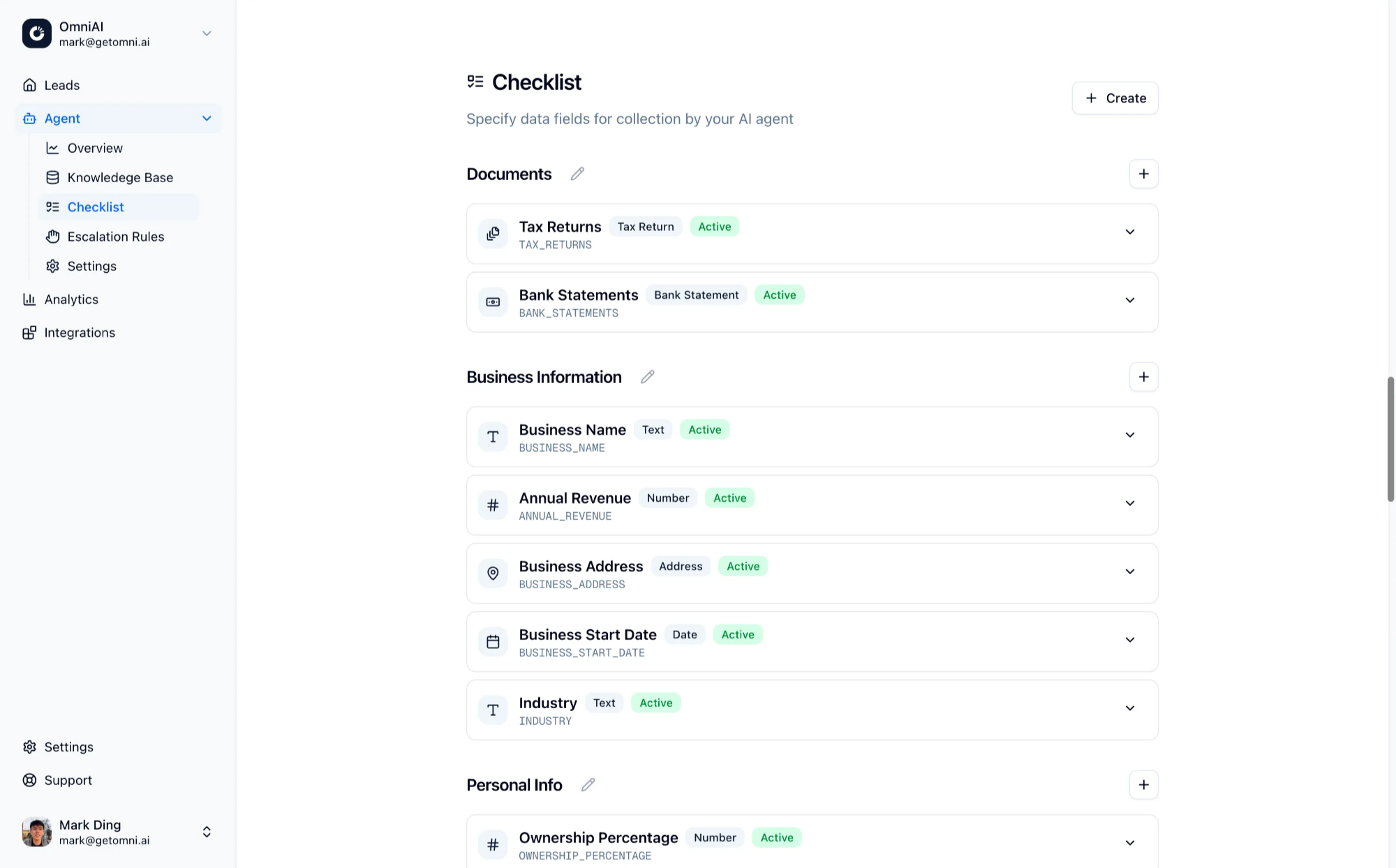
### 1. Set Up Your Checklist
* Define required documents and information for your loan process
* Configure validation rules for each checklist item
* Set field types (text, file upload, date, etc.)
* Mark which items are required vs optional
* Add help text and guidance for applicants
 ### 2. Import Drop-off Leads
There are a few ways you can import your drop-off leads:
* **CSV upload**
* **Email imports**
* **Webhook imports**
* **Manual imports**
For more details, please see [Imports](/leads/imports).
### 3. Intelligent Follow-up Scheduling & Personalized Messages
AI determines optimal timing and creates contextual messages:
* **Smart Timing**: Analyzes applicant's timezone and engagement patterns
* **Personalized Content**: References specific missing checklist items and application progress
* **Multi-channel Delivery**: Automatically chooses SMS or email based on available contact info
You can write custom follow up instructions in the agent workflow prompt. For
example, if you want to prioritize collecting all the documents first from the
applicants, you could write *"Please focus on collecting all required
documentation first before proceeding to other checklist items."*
## Example Scenarios
### Scenario 1: Incomplete Documents
* **Trigger**: Applicant uploaded bank statements but missing income verification
* **AI Action**: Schedules follow-up for next business day at 10 AM local time
* **Message**: "Hi \[Name], thanks for submitting your bank statements! To complete your application, we just need your income verification. You can upload it here: \[link]"
### Scenario 2: Document Review Issues
* **Trigger**: Uploaded document failed validation
* **AI Action**: Immediate follow-up with specific guidance
* **Message**: "Hi \[Name], we received your document but need a clearer photo. Please retake ensuring all corners are visible: \[link]"
## Benefits
* **Automated Detection**: System automatically identifies when applicants need follow-up
* **Intelligent Timing**: Follow-ups are scheduled at optimal times based on timezone and engagement patterns
* **Personalized Messages**: Each follow-up references specific missing items and progress
* **Multi-channel**: Works across email and SMS channels
## Related Guides
Configure your checklist requirements
Learn how to import drop-off leads
Customize follow-up behavior
Enable automatic follow-ups
### 2. Import Drop-off Leads
There are a few ways you can import your drop-off leads:
* **CSV upload**
* **Email imports**
* **Webhook imports**
* **Manual imports**
For more details, please see [Imports](/leads/imports).
### 3. Intelligent Follow-up Scheduling & Personalized Messages
AI determines optimal timing and creates contextual messages:
* **Smart Timing**: Analyzes applicant's timezone and engagement patterns
* **Personalized Content**: References specific missing checklist items and application progress
* **Multi-channel Delivery**: Automatically chooses SMS or email based on available contact info
You can write custom follow up instructions in the agent workflow prompt. For
example, if you want to prioritize collecting all the documents first from the
applicants, you could write *"Please focus on collecting all required
documentation first before proceeding to other checklist items."*
## Example Scenarios
### Scenario 1: Incomplete Documents
* **Trigger**: Applicant uploaded bank statements but missing income verification
* **AI Action**: Schedules follow-up for next business day at 10 AM local time
* **Message**: "Hi \[Name], thanks for submitting your bank statements! To complete your application, we just need your income verification. You can upload it here: \[link]"
### Scenario 2: Document Review Issues
* **Trigger**: Uploaded document failed validation
* **AI Action**: Immediate follow-up with specific guidance
* **Message**: "Hi \[Name], we received your document but need a clearer photo. Please retake ensuring all corners are visible: \[link]"
## Benefits
* **Automated Detection**: System automatically identifies when applicants need follow-up
* **Intelligent Timing**: Follow-ups are scheduled at optimal times based on timezone and engagement patterns
* **Personalized Messages**: Each follow-up references specific missing items and progress
* **Multi-channel**: Works across email and SMS channels
## Related Guides
Configure your checklist requirements
Learn how to import drop-off leads
Customize follow-up behavior
Enable automatic follow-ups